UPBOCW Renewal Online 2026 – Shramik Card Navinikaran
Important Notice Before You Start: Before jumping straight into the renewal process, take 30 seconds to check your Shramik Card’s “Valid Up To” (वैधता) date — either on your downloaded certificate PDF or by logging in at upbocw.in. If your card is still active, you do not need to renew today, and doing so prematurely can sometimes cause system errors. Save this page and come back when your expiry is within 30–60 days.
What Is UPBOCW Renewal — And Why You Cannot Ignore It
Let me be straight with you. A lot of construction workers in UP register for their Shramik Card once, breathe a sigh of relief, and then forget about it entirely. That’s a costly mistake.
Your UPBOCW labour card is not a permanent document. It expires. And when it does, every single benefit you were receiving — from the Kanya Vivah grant (₹55,000) to your children’s Atal Residential School admission, from maternity assistance to accident insurance — everything stops. The board doesn’t send you a reminder. It just stops. Benefits suspended, applications rejected, funds not released.
The UPBOCW Renewal Online process — known as पंजीकरण नवीनीकरण (Panjeeyan Navinikaran) — is the official mechanism through which you extend your Shramik Card’s validity through the UP Building and Other Construction Workers Welfare Board portal at upbocw.in. In 2026, the entire process has been moved online, integrated with Aadhaar e-KYC, and can be done from your mobile phone in under 15 minutes — no government office visit needed, no middleman, no agent fees.
But there are steps where people consistently make errors. Wrong registration number entry, mismatched Aadhaar details, failed OTP because the mobile isn’t linked — small mistakes that cause big delays. This guide covers all of it.
Who Needs to Renew — Eligibility and Validity Period
Not everyone’s card has the same validity period, and this is something most people get confused about.
When you first registered under UPBOCW, you either chose a 1-year membership or a 3-year membership. The renewal timeline depends entirely on what you originally selected.
- 1-Year Card: Expires 12 months from your registration date. You must renew annually.
- 3-Year Card: Valid for 3 years. More cost-effective, and honestly the smarter choice if you’re a long-term construction worker in UP.
To renew, you need to be an active construction worker who has completed at least 90 days of work in the past 12 months. You’ll need a fresh Niyojan Praman Patra (work certificate) confirming this. Your bank account should also be active and NPCI-mapped for Aadhaar-based DBT payments — more on why this matters later.
One thing worth noting: if your card has already expired, you can still renew, but a late fee may be added to your base renewal charge. The board doesn’t permanently blacklist you for a late renewal, but the sooner you do it, the better. Every day your card sits expired is a day you’re not eligible for the schemes.
Renewal Fee — How Much Will You Pay in 2026
The renewal fee is nominal, especially considering what’s at stake. Here’s the current structure:
| Renewal Duration | Approximate Fee |
|---|---|
| 1 Year | ₹20 to ₹50 |
| 3 Years | ₹100 to ₹150 |
| Late Renewal (after grace period) | Base fee + small penalty |
These are the standard fee ranges. Fees are collected online through the official payment gateway, so you pay via UPI, debit card, or net banking — no cash, no agent, no receipt fraud.
A word of practical advice: the 3-year renewal option costs roughly double the 1-year fee, but saves you from going through the entire process again next year. Given the process, the documentation, and the time involved — the 3-year option is almost always worth it.
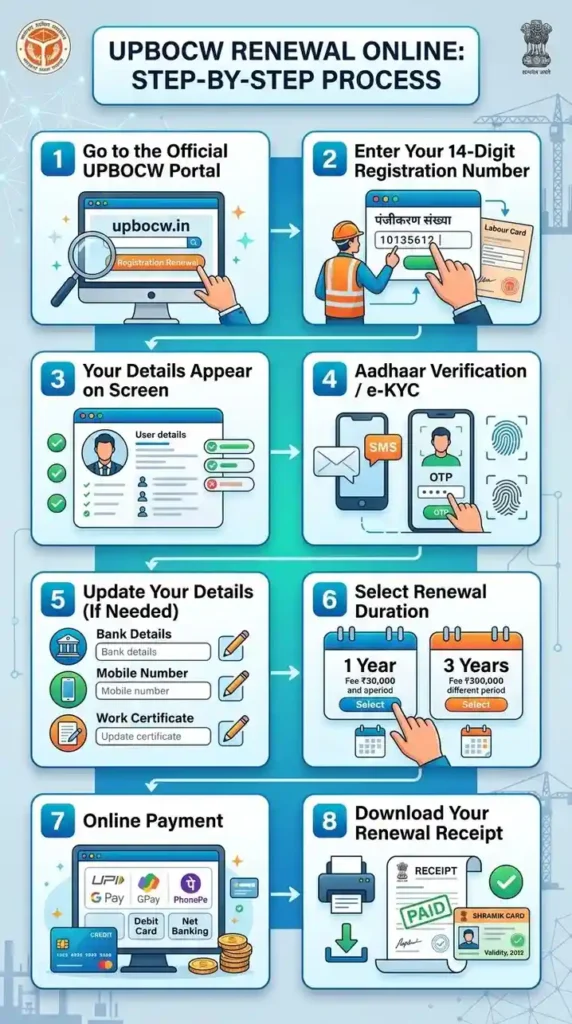
UPBOCW Renewal Online — Step-by-Step Process
This is the heart of what you came here for. Follow each step carefully. Don’t skip ahead.
Step 1 — Go to the Official UPBOCW Portal
- Open your browser and go to upbocw.in — that’s the only official portal. Do not use any third-party websites that claim to offer “renewal services.” They charge unnecessary fees and often do nothing.
- On the homepage, scroll down slightly or look at the navigation menu. You’ll find the option “पंजीयन नवीनीकरण” (Panjeeyan Navinikaran / Registration Renewal). You can also use the direct link on the uplmis.in renewal page — the same board maintains both domains.
Step 2 — Enter Your 14-Digit Registration Number
- Once you click on “पंजीयन नवीनीकरण,” a new page loads asking for your details.
- Enter your 14-digit Shramik Registration Number (पंजीकरण संख्या). This is the number you received when you first registered — it’s printed on your Shramik Card and also visible when you download your labour certificate PDF.
- Then fill in the Captcha code shown on screen and click the “Search” (खोजें) button.
- Common mistake here: Many workers enter their 12-digit Aadhaar number instead of their 14-digit registration number. These are two different things. Your registration number starts with your district code and was issued by UPBOCW at the time of registration.
Step 3 — Your Details Appear on Screen
- After clicking Search, your registered details will appear — your name, district, registered mobile number, card validity status, and last renewal date.
- If you see a message saying “Aadhaar Verification Pending” (आधार सत्यापन लंबित), don’t panic. This just means you need to complete Aadhaar e-KYC before proceeding. The portal will guide you through it.
Step 4 — Aadhaar Verification / e-KYC
- The renewal system requires Aadhaar-based verification. The portal will ask you to confirm your 12-digit Aadhaar Number and will send a 6-digit OTP to your Aadhaar-linked mobile number.
- Enter the OTP and click “Verify” (प्रमाणित करें).
Critical point: Your mobile number must be linked to your Aadhaar for this step to work. If your number isn’t linked or you’ve changed phones since registration, you’ll need to visit an Aadhaar enrollment centre to update it first. There’s no workaround — this is a mandatory security requirement the government introduced to prevent fraudulent renewals.
Step 5 — Update Your Details (If Needed)
Once verified, the system will show your full profile. This is a good time to update anything that’s changed since your last registration or renewal:
- Bank Account Details: If you’ve opened a new account or changed banks, update the Account Number and IFSC Code here. Make sure the new account is NPCI-Aadhaar linked — if it’s not, your scheme money won’t transfer even after approval.
- Mobile Number: If your phone number has changed and you’ve already updated it in Aadhaar, update it here too.
- Work Certificate: Upload a fresh Niyojan Praman Patra confirming 90 days of work in the last year. Document format should be JPG/PNG/PDF, under 100KB in file size.
Step 6 — Select Renewal Duration
The portal will ask you: do you want to renew for 1 year or 3 years? Make your selection carefully. Once payment is processed, this cannot be changed.
As mentioned earlier, the 3-year option is the better financial decision for most workers.
Step 7 — Online Payment
After selecting the renewal period, the portal takes you to the payment page. Pay the applicable fee using any of these methods:
- UPI (PhonePe, Google Pay, Paytm — all work)
- Debit Card
- Net Banking
Do not close the browser or press the back button during payment. Wait for the confirmation screen. Once the payment goes through, your renewal is processed instantly.
Step 8 — Download Your Renewal Receipt
After successful payment, the system generates a Payment Receipt / Acknowledgement. Download it or take a screenshot. This is your proof that renewal was completed.
Your Shramik Card validity is now extended. You can verify the new “Valid Up To” date by going to the Labour Certificate download section and downloading a fresh copy.
How to Check UPBOCW Renewal Status Online
Applied for renewal but not sure if it went through? Here’s how to verify:
- Go to upbocw.in
- Click on the “श्रमिक” (Worker) menu in the top navigation
- Select “नवीनीकरण की स्थिति” (Renewal Status)
- Enter your 14-digit Registration Number and the Captcha code
- Click Search
Your renewal details, payment status, and new validity date will appear on the screen. If the status shows “Approved” and the new expiry date is visible, your renewal is complete. You’re good to go.
If the status shows “Pending” for more than 3–5 working days after payment, keep the payment receipt ready and contact the UPBOCW helpline at 1800-180-5160.
Documents Required for UPBOCW Renewal
Renewal is simpler than fresh registration in terms of documents, but you still need a few things ready:
- 14-Digit Shramik Registration Number — From your old card or previous renewal receipt
- Aadhaar Card — For e-KYC verification
- Aadhaar-Linked Mobile Number — For OTP authentication
- Niyojan Praman Patra (Work Certificate) — Proving 90 days of construction work in the last 12 months
- Bank Passbook — If updating bank details, you’ll need Account Number and IFSC Code
The work certificate is the one document that trips people up most often. It must be issued by your contractor or employer and must clearly mention your work dates and the construction site address. The UPBOCW system cross-checks this. Vague or undated certificates are a common rejection reason.
Renewal Rejected or Stuck? Here’s What’s Actually Happening
Getting your renewal stuck in “Pending” or seeing “Rejected” is frustrating, especially when you’ve already paid the fee. Here are the most common real-world reasons this happens:
Reason 1 — Name Mismatch Between Aadhaar and Bank Account
Your name on the Shramik Card, your Aadhaar, and your bank passbook all need to match — exactly. Not approximately. Even a single-letter difference (like “Mohammad” vs “Mohammed”) is enough to flag your application. Visit your bank branch and get the name corrected to match your Aadhaar exactly.
Reason 2 — Expired or Invalid Work Certificate
If your Niyojan Praman Patra is dated more than 12 months ago, or if the contractor’s mobile number on the certificate is unreachable, the system may reject it. Get a fresh certificate from your current or most recent employer.
Reason 3 — NPCI Mapping Not Done
Your DBT scheme payments travel through the NPCI (National Payments Corporation of India) Aadhaar-to-bank mapping system. If your bank account isn’t mapped to your Aadhaar in the NPCI database, approved scheme money just… sits there uncredited. Visit your bank and ask them to verify or activate your NPCI Aadhaar mapping. It’s a 10-minute process.
Reason 4 — Poor Document Quality
The 2026 portal uses automated document scanning. Blurry phone photos, over-exposed images, or scans where text isn’t clearly readable get auto-rejected. Use good lighting, hold the document flat, and make sure the text is sharp. Keep file sizes under 100KB.
What to Do After Rejection
- First, try the online fix: Log in to the portal and use the “संशोधन” (Modification) option to re-upload corrected documents or fix details.
- If the portal doesn’t resolve it: Visit your local Labour Office (श्रम कार्यालय) or a CSC e-District Centre in person. Carry original Aadhaar and bank passbook.
- For name-mismatch issues: The fix has to happen at the bank or Aadhaar level first — no portal option can override a fundamental identity mismatch.
What Happens to Your Scheme Benefits During Renewal
This is something almost nobody explains properly, so let me be clear. When your card expires and you haven’t renewed, your scheme eligibility is suspended — not permanently cancelled, but suspended. You cannot submit new scheme applications. Pending payments for already-approved applications may also be paused, depending on the scheme.
Once your renewal goes through and your card is active again, your eligibility is restored. For most schemes, you can resume applications immediately. For schemes that have specific timing requirements (like the Atal Residential School admissions, which have annual deadlines), you need to ensure your renewal is done well before those deadlines.
The key takeaway: renewal is not optional. It’s the mechanism that keeps your entire welfare safety net active.
UPBOCW Renewal vs. Fresh Registration — What’s the Difference
This comes up a lot. Here’s a quick breakdown:
Fresh Registration (नया पंजीकरण):
- For workers who have never been registered with UPBOCW
- Requires more documents, including a new Aadhaar e-KYC
- Takes a few days for approval
- Results in a new 14-digit registration number
Renewal (नवीनीकरण):
- For workers who are already registered but whose card has expired or is about to expire
- Uses your existing 14-digit registration number
- Faster process — often approved within 1–2 working days
- Requires updated work certificate and fresh Aadhaar OTP verification
- Costs a nominal fee (₹20–₹150 depending on duration)
If you already have a registration number, you need renewal — not fresh registration. Attempting to register again as a new user when you’re already in the system is not permitted and will be flagged.
Can You Renew at a CSC Centre or Offline?
Yes, but with conditions.
The official UPBOCW portal is the primary and preferred channel. However, if you’re facing issues with:
- OTP not coming because your mobile isn’t linked to Aadhaar
- Fingerprint-based Aadhaar verification needed
- Technical portal errors that aren’t resolving
…you can visit a Jan Seva Kendra (CSC Centre) or your district’s Labour Office for assisted renewal. The process is the same, but an operator helps you complete it. Carry all your original documents.
Important: CSC operators may charge a nominal service fee (typically ₹20–₹50). This is separate from the official renewal fee. Make sure you get a receipt for both payments.
UPBOCW Renewal — Frequently Asked Questions
How many days before expiry should I renew my Shramik Card?
Ideally, start the renewal process 30 to 60 days before your card’s expiry date. The portal accepts renewal applications before expiry. Waiting until the last day creates unnecessary stress, and if there’s a document issue, you won’t have time to fix it.
What if I forgot my 14-digit registration number?
Go to the official portal, click on “Registration Status” (पंजीयन की स्थिति), and search using your Aadhaar number. Your registration number will appear in the search results.
Can a family member renew on behalf of the worker?
Not directly through the portal — the renewal requires OTP verification on the worker’s own Aadhaar-linked mobile number. However, a family member can physically assist with form filling and payment if the worker is present with their phone.
My renewal payment went through but the status still shows “Pending” — what do I do?
Keep your payment transaction ID or screenshot. Wait 3–5 working days, as processing sometimes takes a little time. If it’s still showing pending after that, call the helpline at 1800-180-5160 with your registration number and payment details.
Is there any age restriction for renewal?
You must be between 18 and 60 years old to hold an active UPBOCW registration. If you’ve crossed 60, you’ll receive a one-time retirement benefit instead.
What if my mobile number has changed since I last registered?
You must first update your mobile number in Aadhaar at an enrollment centre. Once Aadhaar reflects the new number, OTP verification will work on the portal. There is no way to bypass the Aadhaar-linked OTP requirement.
UPBOCW Help & Support
If you’re stuck at any point and the portal isn’t cooperating, here’s where to reach out:
- Official Helpline (Toll-Free): 1800-180-5160 (Monday to Friday, 10:00 AM – 5:00 PM)
- Alternate Number: 0522-2723921
- Email (for portal errors with screenshots): upbocboardlko@gmail.com
- Head Office: UPBOCW, 2nd Floor, A & D Block, Kisan Mandi Bhawan, Vibhuti Khand, Gomti Nagar, Lucknow – 226010
For district-level issues, visit your nearest Labour Office (श्रम कार्यालय) or a Jan Seva Kendra — both can provide hands-on assistance with renewal and document corrections.
Final Word — Don’t Let Your Card Lapse
The UPBOCW Shramik Card isn’t just a piece of paper or a digital certificate. For millions of construction workers across Uttar Pradesh, it’s the document that stands between their families and financial hardship when something goes wrong on a worksite. The accident insurance, the daughter’s wedding grant, the school admission for your kids — none of that happens without an active card.
Renewal takes 15 minutes online. The fee is barely ₹50 for a year. There’s no good reason to let it lapse.
If you’ve found this guide useful, bookmark this page. We update it every time the official UPBOCW portal changes its process or fee structure — which happens more often than you’d think. And if you run into a step that’s different from what’s described here, drop us a note through the contact page and we’ll verify and update it.