UPBOCW Registration 2026 – Shramik Card Apply Online
Let me be straight with you — most workers I’ve seen lose out on thousands of rupees in government benefits simply because nobody ever explained the registration process clearly. The UPBOCW registration is not just a formality. It is the single gateway through which a construction worker in Uttar Pradesh gets officially recognized by the state government and becomes entitled to a whole range of welfare schemes that are otherwise completely out of reach.
UPBOCW stands for Uttar Pradesh Building and Other Construction Workers Welfare Board — यूपी भवन एवं अन्य सन्निर्माण कर्मकार कल्याण बोर्ड. This is a statutory body operating under the Building and Other Construction Workers (Regulation of Employment and Conditions of Service) Act, 1996, and it runs specifically to protect the social and economic security of laborers working in the unorganized construction sector across UP.
Once you complete UPBOCW registration on the official portal upbocw.in, you receive a Shramik Card (Labour Card / श्रमिक कार्ड). This card is your proof of identity as a registered construction worker under the UP Labour Department. From that moment, you qualify for more than 18 welfare schemes — covering everything from your daughter’s marriage expenses to your children’s CBSE school admission, free medical treatment, maternity benefits, and accident insurance.
If you have been working as a mason, carpenter, plumber, painter, electrician, or in any other construction-related trade in UP for at least 90 days in the past year — this registration is meant for you, and you absolutely should not delay it.
Who Can Register? UPBOCW Eligibility Criteria
Before filling a single form, understand whether you actually qualify. The board is strict about eligibility, and submitting an application without meeting these conditions will only waste your time.
Age Requirement
You must be between 18 and 60 years of age at the time of registration. There is no exception to this — applicants below 18 or above 60 will be automatically rejected.
Work Experience Requirement
This is the condition most people trip over. You must have completed a minimum of 90 days of construction work within the last 12 months. This isn’t 90 days at one company or one site — it is cumulative across any construction work you have done. The 90-day proof is submitted through a document called the Niyojan Praman Patra (Employment Certificate / Form-27), which your contractor or employer issues.
Residency
You must be a permanent resident of Uttar Pradesh. If you are a migrant worker originally from Bihar, Jharkhand, or another state but are currently working in UP, you may face eligibility challenges at the verification stage. The board prioritizes UP-domicile workers.
Type of Work
Not every kind of labor qualifies. UPBOCW registration is specifically for workers in the construction and building sector. The board has a defined list of 40+ approved trades. Some of the most common ones include:
- Rajmistry (Mason) and masonry helpers
- Carpenter (Barhai) and woodwork assistants
- Plumber and pipe-fitter
- Electrician on construction sites
- Painter (Putai), Polish and surface preparation worker
- Welder and fabricator
- Tile layer and marble/stone polisher
- Road construction worker, bridge builder, dam or tunnel laborer
- Blacksmith (Lohar) working in construction
- Brick kiln worker, sand and stone quarry worker
- Well digger and water supply line installer
- Lift and escalator installer
If your trade is in this category, you are in the right place. During registration, you will select your exact work type from a dropdown menu on the portal — so don’t worry about memorizing all 40+ options now.
UPBOCW Registration Online — Step-by-Step Process
The entire registration process is digital and can be completed from home using a smartphone or computer. Here is the exact path to follow:
Step 1: Open the Official Registration Portal
Go to the official website: upbocw.in
On the homepage, look for the button labeled “श्रमिक पंजीयन / संशोधन” (Labour Registration / Modification). This is usually displayed prominently on the main screen. Clicking this takes you to the actual registration gateway hosted on uplmis.in — this is also an official government domain, so don’t be alarmed by the URL change.
Important: Do not use any third-party website claiming to offer UPBOCW registration “faster” or “for a fee.” The official registration is free of charge. Any agent asking for money beyond the nominal renewal fee is operating outside official channels.
Step 2: Enter Your Location and Aadhaar Details
On the registration form page, you will need to fill in:
- Mandal (मण्डल): Select your administrative circle from the dropdown. For example — Lucknow, Kanpur, Agra, Varanasi, Meerut, Allahabad (Prayagraj), Gorakhpur, etc.
- District (जनपद): Select your home district.
- Aadhaar Number (आधार संख्या): Enter all 12 digits carefully. One wrong digit means OTP goes to the wrong place.
- Registered Mobile Number: Enter the mobile number that is linked to your Aadhaar.
Step 3: OTP Verification (e-KYC)
Click the “Search / खोजें” button. Within a few seconds, a 6-digit OTP will arrive on your Aadhaar-linked mobile number. Enter this OTP in the field provided and click “Verify / प्रमाणित करें.”
This OTP step is the e-KYC (Electronic Know Your Customer) verification. It confirms that the person registering is the genuine Aadhaar holder. If you don’t receive the OTP within 60 seconds, click “Resend OTP” once. If it still doesn’t come, the issue is likely that your mobile number is not linked to Aadhaar — you’ll need to get that fixed at an enrollment center.
Step 4: Filling the Main Registration Form
Once OTP verification is successful, the full registration form opens. Fill in these sections with care:
Personal Information:
- Full name (exactly as on Aadhaar), Father’s/Husband’s name, date of birth
- Gender, category (General/OBC/SC/ST)
- Permanent address with PIN code
Work Details:
- Select your work type from the list of 40+ approved trades
- Confirm your 90-day work experience in the last 12 months (this is a declaration checkbox)
- Name of the contractor or employer, site address
Bank Details:
- Account Number and IFSC Code
- Ensure the bank name and branch are auto-populated correctly after entering IFSC
Nominee Details:
- Name of nominee (family member — spouse, parent, or child)
- Relationship to you
Take your time here. Errors in bank details are the single biggest reason for DBT payment failures later on.
Step 5: Document Upload
Upload the scanned copies of:
- Aadhaar Card
- Bank Passbook (first page)
- Niyojan Praman Patra (Work Certificate)
- Passport-size photograph
Each file must be under 100KB. Double-check that every uploaded image is readable — if a verification officer can’t read your bank account number in the uploaded passbook, the application gets flagged.
Step 6: Final Submission
Read the declaration statement at the bottom of the form. Tick the checkbox to confirm all information is correct and genuine. Then click “Submit / जमा करें.”
After successful submission, you will see a confirmation screen with your Application Number (आवेदन संख्या) — typically a short numerical code. Save this or take a screenshot immediately. You will need this number to track your registration status.
Your application now goes to the district Labour Office for verification and approval. This typically takes between 7 to 15 working days.
How to Check UPBOCW Registration Status (पंजीयन की स्थिति)
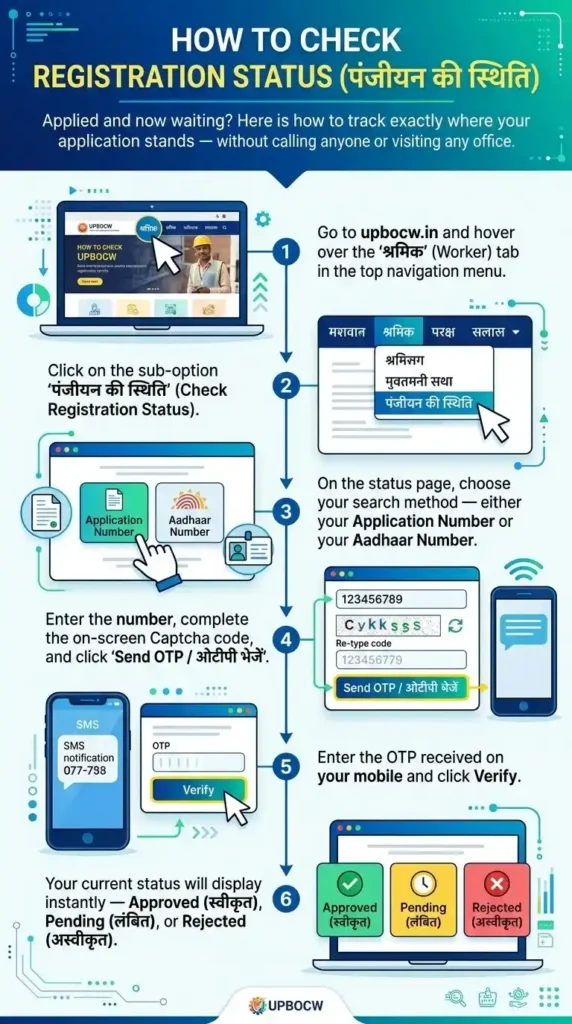
Applied and now waiting? Here is how to track exactly where your application stands — without calling anyone or visiting any office.
- Go to upbocw.in and hover over the “श्रमिक” (Worker) tab in the top navigation menu.
- Click on the sub-option “पंजीयन की स्थिति” (Check Registration Status).
- On the status page, choose your search method — either your Application Number or your Aadhaar Number.
- Enter the number, complete the on-screen Captcha code, and click “Send OTP / ओटीपी भेजें.”
- Enter the OTP received on your mobile and click Verify.
- Your current status will display instantly — Approved (स्वीकृत), Pending (लंबित), or Rejected (अस्वीकृत).
If your status shows Approved, congratulations — you are now a registered BOCW worker. Your Shramik Card is active and you can apply for welfare schemes. If it shows Pending for more than 15 days, read the troubleshooting section below. If it says Rejected, the reason is usually a document issue that you can correct and resubmit.
Why Is My UPBOCW Registration Still Pending — Real Causes and Fixes
If your application has been sitting in “Pending” status for more than two weeks, it’s almost certainly flagged for one of these specific reasons. This is not something most sites will tell you clearly, but having seen what actually triggers rejection at the verification stage, here is the honest breakdown:
Cause 1: Unclear or Unverifiable Work Certificate The Niyojan Praman Patra is manually reviewed. If the contractor’s contact number on the certificate is unreachable, or if the work dates overlap with a previous registration, the system or the reviewing officer will flag it. Solution: Get a fresh certificate with current, reachable contact information.
Cause 2: Name Mismatch Between Aadhaar and Bank Passbook Even a minor spelling difference — like “Ramesh” on Aadhaar and “Ram Esh” on the passbook — is enough to hold up your DBT mapping. Visit your bank and ensure your name matches your Aadhaar exactly. Most nationalized banks update this with just your Aadhaar card copy.
Cause 3: Low-Quality Document Scans The portal’s verification layer in 2026 flags blurry documents automatically. If your uploaded passbook scan is taken in poor lighting or at an angle, re-scan it properly and use the “Modification / संशोधन” option to reupload.
Cause 4: Mobile Not Aadhaar-Linked This one seems obvious but catches many people mid-application. Without a linked mobile, the OTP system breaks down and your application cannot proceed to the approval stage.
What To Do If Pending Beyond 15 Days: Log back into the portal and look for the “संशोधन” (Modification) option. You can correct and reupload documents here. If that doesn’t resolve it within another week, physically visit your District Labour Office (श्रम कार्यालय) with your original Aadhaar card, bank passbook, and work certificate. The officer can manually verify and push your application forward.
UPBOCW Shramik Card Download — Get Your Labour Certificate as PDF
Once your registration is approved, you can download your official Shramik Card (Labour Certificate / श्रमिक सर्टिफिकेट) anytime. You’ll need this for school admissions under the Atal Residential Schools scheme, applying for marriage grants, maternity benefits, and several other purposes.
Here is how to download it:
- Go to upbocw.in and hover over the “श्रमिक” (Worker) menu.
- Click “श्रमिक सर्टिफिकेट” (Labour Certificate).
- Enter your 14-digit Registration Number (पंजीयन संख्या) or your Aadhaar Number.
- Complete the Captcha, click “Search / खोजें,” verify the OTP on your mobile.
- Your digital Shramik Card PDF will appear on screen. Click Download to save it.
Print a physical copy and keep it safe. You will need it repeatedly — at your children’s schools, at banks to confirm DBT eligibility, and whenever you apply for a new welfare scheme.
18+ Welfare Schemes Available After UPBOCW Registration
This is the real reason every construction worker should register. The schemes listed below are funded by the BOCW welfare fund and are directly credited to your bank account via DBT — no middleman, no bribe required.
Kanya Vivah Sahayta (कन्या विवाह सहायता)
Financial assistance for your daughter’s marriage. Under the current structure: ₹55,000 for general cases, ₹65,000 if the worker herself is female and getting married, and up to ₹1,00,000 for mass/group marriages (Samuhik Vivah events). Verify the latest figures on the portal before filing — amounts are subject to cabinet revision.
Matritva, Shishu Evam Baalika Madad (मातृत्व, शिशु एवं बालिका मदद)
For female registered workers: 3 months’ wages at minimum wage rate, plus a ₹1,000 medical bonus. For newborns: ₹20,000 for a boy child and ₹25,000 for a girl child. This is applicable for the first two children only.
Santaan Pathya Sahayta (शिक्षा सहायता / Scholarship)
Scholarship amounts for children studying from Class 1 to postgraduate level. The amounts increase with each educational level, and children of registered workers can receive this year after year as long as the Shramik Card is active and renewed.
Atal Awasiya Vidyalaya (अटल आवासीय विद्यालय)
This is the flagship scheme most UP construction workers don’t know about. 18 fully residential CBSE schools across UP — in Lucknow, Kanpur, Varanasi, Meerut, Allahabad, and other divisions — offer free education, boarding, and meals to children of registered BOCW workers. Admissions for Class 6 and Class 9 happen through an entrance exam, typically held in February each year. The eligibility condition: the worker’s Shramik Card must have been active for at least 3 years (registered by November 30, 2022 for the 2026-27 cycle). If your card is newer than that, start the clock now.
Death and Disability Assistance (मृत्यु एवं दिव्यांगता सहायता)
In case of accidental death at a construction site, the family receives up to ₹5,00,000. For natural death of a registered worker, the benefit is up to ₹2,00,000. Permanent disability from a work accident also qualifies for a lump-sum grant. This alone is reason enough for every construction worker to register — your family has no safety net otherwise.
Awaas Sahayta (आवास सहायता)
Housing assistance grant for workers who wish to build their own home. The amount has been revised periodically — check the current figure on the schemes section of upbocw.in before applying.
Chikitsa Suvidha (चिकित्सा सुविधा)
Medical reimbursement for serious illnesses. Workers undergoing treatment for critical conditions like cancer, kidney disease, or heart surgery can apply for medical expense coverage under this scheme.
Pension Yojana (पेंशन योजना)
Registered workers who reach 60 years of age and have maintained an active Shramik Card for a minimum period receive a monthly pension. The integration with Pariwar ID (Family ID) in 2026 has streamlined this — eligible workers are now being automatically identified without needing a separate application in some districts.
How to Apply for UPBOCW Welfare Schemes After Registration
Getting registered is step one. Applying for specific schemes is a separate process, done through the “योजना आवेदन” (Scheme Application) section of the portal.
- Go to upbocw.in and click “योजना आवेदन” (Apply for Scheme).
- You will be redirected to uplmis.in — the official scheme application portal.
- Log in using your Aadhaar and OTP.
- Select the scheme you want to apply for.
- Fill in the scheme-specific form (each scheme has its own required documents).
- Submit and note the Scheme Application Number.
You can check the status of your scheme application separately under “योजना के आवेदन की स्थिति” in the Schemes menu. If approved money has not reached your account, verify your NPCI-Aadhaar bank mapping — this is the most common reason DBT payments stall even after scheme approval.
How to Find Your Name in the UPBOCW Shramik Suchi (District-Wise Worker List)
Not sure if your old registration is still active? You can check the official Shramik Suchi (Labour List) — a publicly viewable directory of all registered workers — to confirm your status before applying for any scheme.
- Visit upbocw.in and click the “श्रमिक” tab.
- Select “श्रमिकों की सूची (जनपदवार / ब्लॉकवार)” — District-wise / Block-wise Worker List.
- Choose your District (e.g., Lucknow, Kanpur, Ghaziabad, Varanasi, Agra, Meerut).
- Select your area type — Nagariya Nikay (Urban) or Vikas Khand (Rural).
- Choose your work type (Mason, Carpenter, Electrician, etc.).
- Click Submit.
The list will display names, registration numbers, and addresses. If your name appears but your card shows “Expired,” go directly to the renewal process.
FAQs
My mobile number is not linked to Aadhaar. Can I still register online?
No. In 2026, the portal mandates Aadhaar-linked mobile OTP for every step of e-KYC. Visit an Aadhaar enrollment/update center first. Most banks and post offices also offer Aadhaar mobile linking services. Do this before you attempt to register.
My registration was rejected. Can I apply again?
Yes. Use the “Modification / संशोधन” option on the portal to correct the issue and resubmit. If the portal doesn’t allow resubmission, visit your District Labour Office with original documents for manual assistance.
Can I register at a CSC (Common Service Centre / Jan Seva Kendra)?
Yes. If you face difficulties with the online process, CSC operators are authorized to assist with UPBOCW registration. Carry all original documents. There may be a small service charge (not an official government fee) for CSC assistance.
Can both husband and wife register separately?
Yes. Each individual who meets the eligibility criteria can register independently. Both can hold separate Shramik Cards and apply for schemes individually.
What is the 14-digit Registration Number?
After your application is approved, you receive a 14-digit Registration Number (पंजीयन संख्या). This is your permanent Shramik Card ID and is used for everything — checking status, downloading certificates, applying for schemes, and renewing. Your initial Application Number (shorter, given after submission) is temporary.