UPBOCW 2026: Login, Registration & Status Check | UP श्रमिक कार्ड सूची, नवीनीकरण
UPBOCW (Uttar Pradesh Building and Other Construction Workers Welfare Board) is the official government body providing social security to state laborers. By registering on upbocw.in, construction workers get a Shramik Card, unlocking 18+ benefits including ₹55,000 marriage aid, maternity grants, and free CBSE education through Atal Residential Schools.
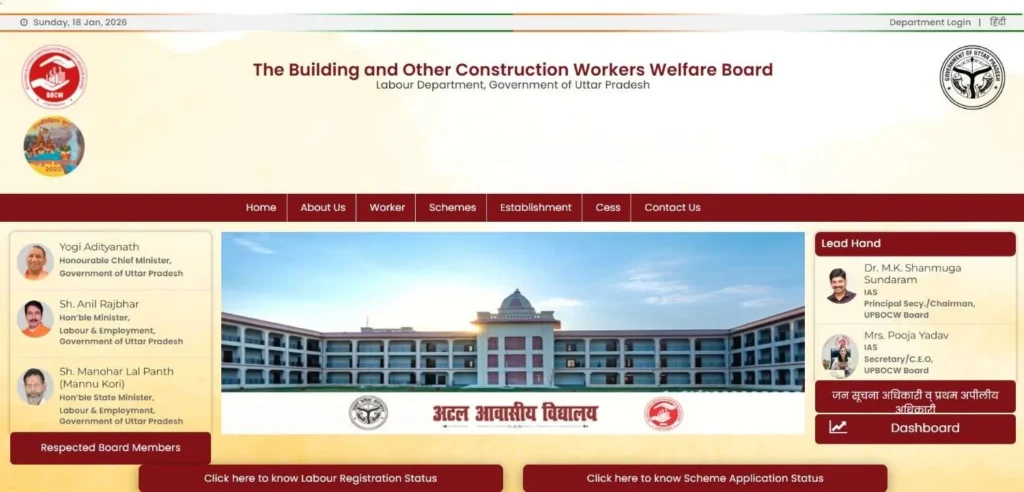
UPBOCW Quick Links: Login, Status Check, and Certificate Download
To protect your data and avoid middleman scams, use these verified paths directly into the upbocw.in database. And Now, the board uses Aadhaar + Mobile OTP for all worker services—there is no permanent password for laborers.
UPBOCW in Login: Step-by-Step Worker Profile Access
Many workers search for a UPBOCW Login and Password, but in 2026, the official portal uses a Password-less OTP Login system. This ensures that your Shramik Card data remains secure and accessible only via your Aadhaar-linked mobile number. If you are already registered and want to check your profile, update bank details, or apply for new schemes, follow these exact login steps:
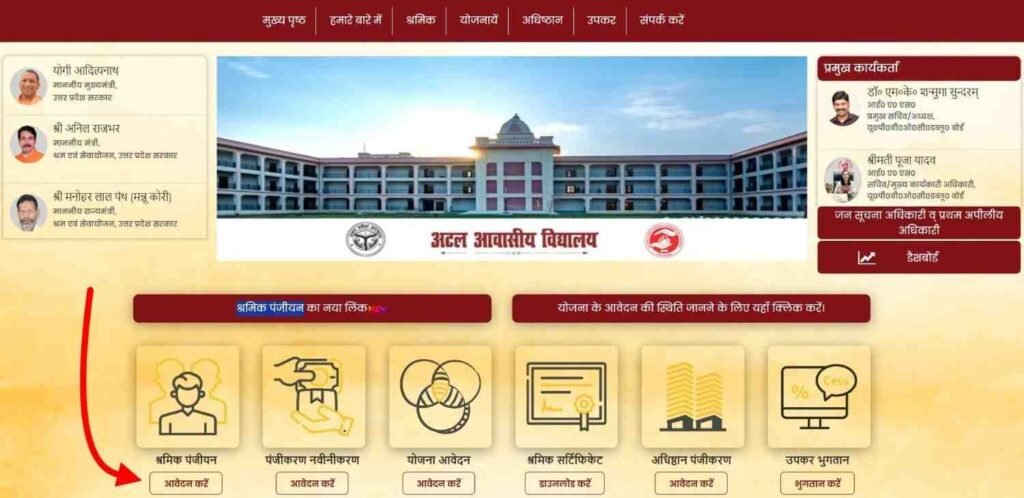
- Step 1: Open the Official Login Gateway. Visit upbocw.in and look for the “श्रमिक पंजीयन” (Labour Registration) option. This is the primary entry point for all registered laborers.
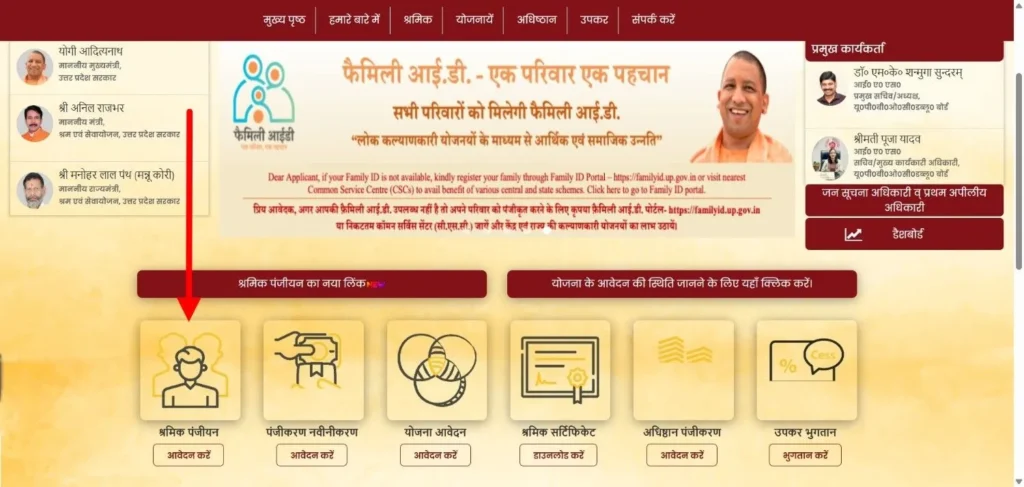
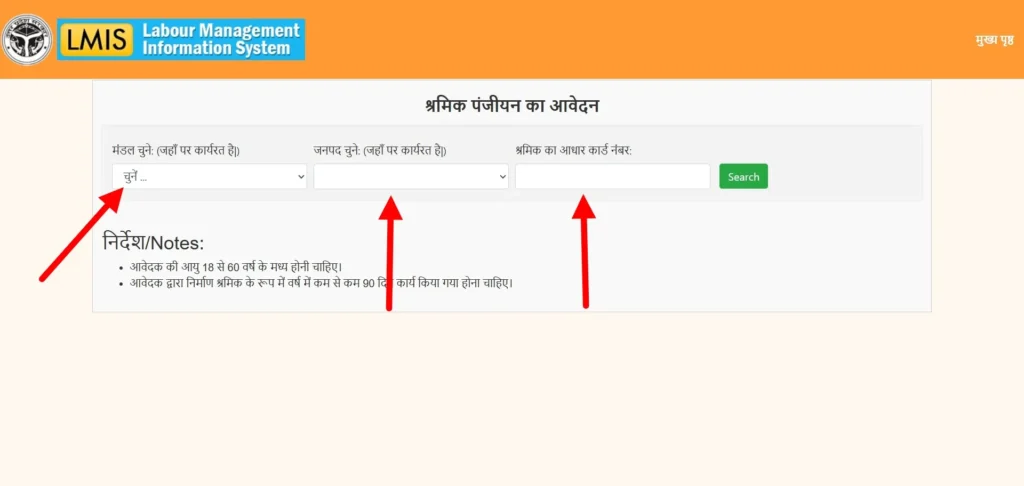
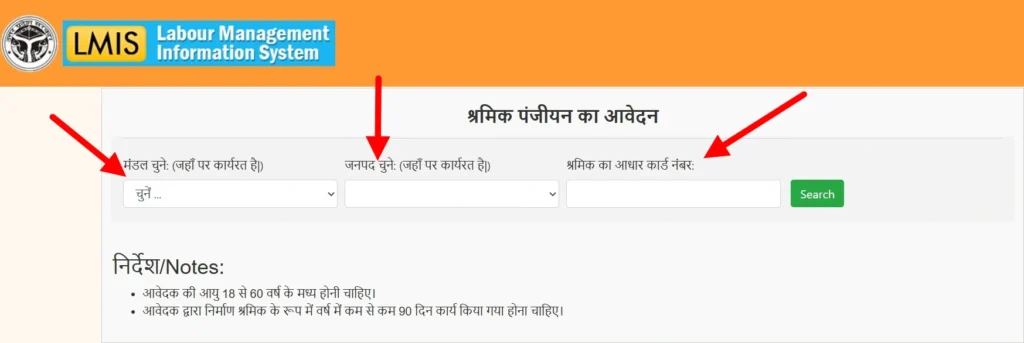
- Step 2: Enter Identity Credentials On the login screen, select your Mandal (Circle) and District (ज़िला). Enter your 12-digit Aadhaar Number (आधार नंबर) and the Mobile Number you used during registration.
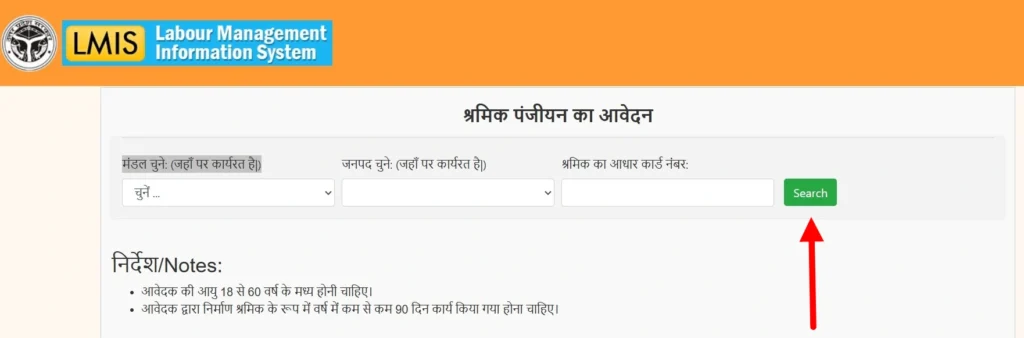
- Step 3: Verification & Search Click on the “Search/खोजें” button. The portal will cross-match your Aadhaar with the 2026 labor database.
- Step 4: Secure OTP Authentication A 6-digit Login OTP will be sent to your phone. Enter this code and click “Verify”.
- Step 5: Access Dashboard Once verified, your Worker Dashboard will open. You are now “Logged In.” From here, you can view your Shramik Card validity, track payments, or modify your personal information.
Note for Users: Avoid using the “Officer Login” link found at the top of the page. That section requires a departmental ID and password. Workers should always use the Aadhaar-based Login path described above.
UPBOCW Registration Status Check (पंजीयन की स्थिति)
Checking your UPBOCW Registration Status ensures your application is Approved and your benefits are active. You can track your status without a full login using these direct steps:
- Step 1: Navigate the Menu: Go to the official site upbocw.in
. Hover over the “श्रमिक” (Worker) menu at the top of the homepage and then click on the sub-option “पंजीयन की स्थिति” (Check Registration Status).
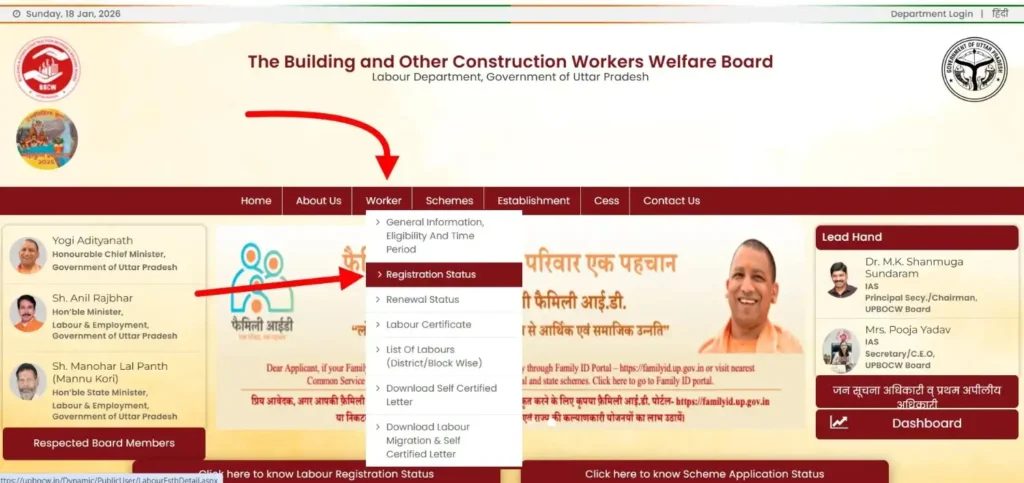
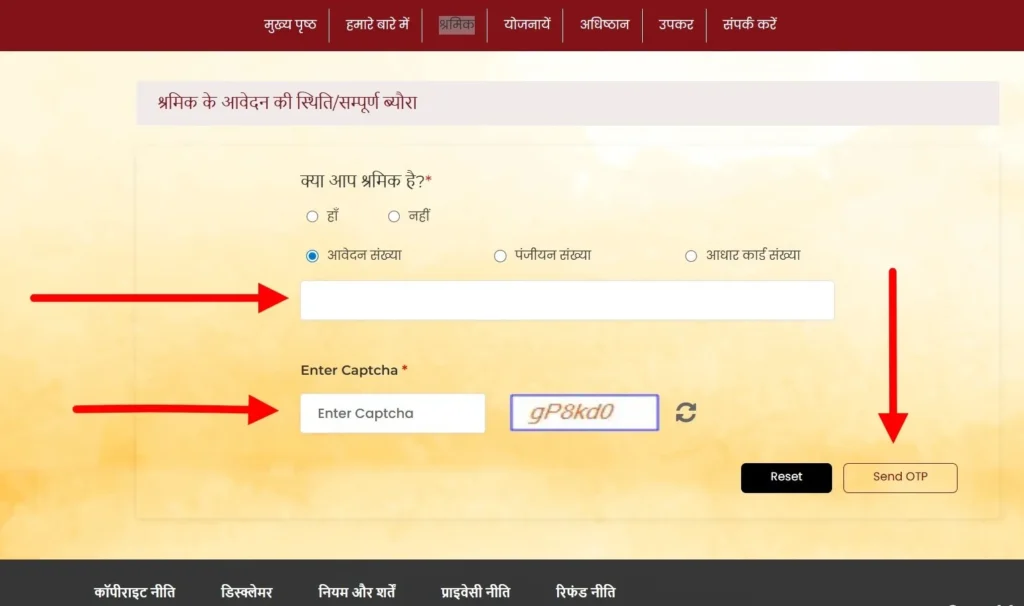
- Step 2: Choose Search Method: On the status page, select your preferred search method: Application ID (02-digit number) OR Aadhaar Number.
- Step 3: Enter Credentials: Enter your chosen number and carefully type the security Captcha code shown on the screen.
- Step 4: Verify & View: Click the “Send OTP” (ओटीपी भेजें) button. Once you verify the 6-digit code received on your mobile, your real-time status (Approved, Pending, or Rejected) will display instantly.
UPBOCW Labour Certificate Download (श्रमिक सर्टिफिकेट)
Need your Labor Card PDF for a school admission or scheme? Follow this direct path to obtain your verified digital certificate from the official database:
- Step 1: Navigate Menu: Visit the official portal upbocw.in
and hover over the “श्रमिक” (Worker) menu on the navigation bar. - Step 2: Select Tool: Click on the sub-option “श्रमिक सर्टिफिकेट” (Labour Certificate).
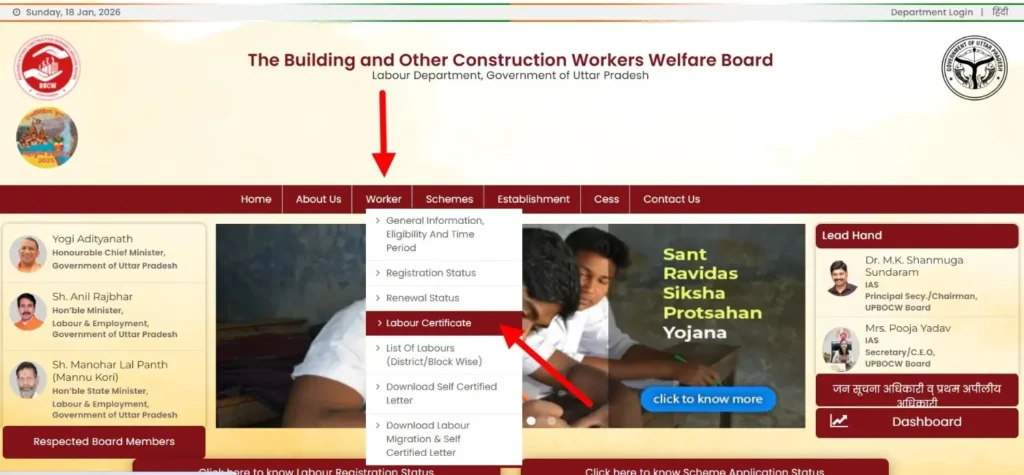
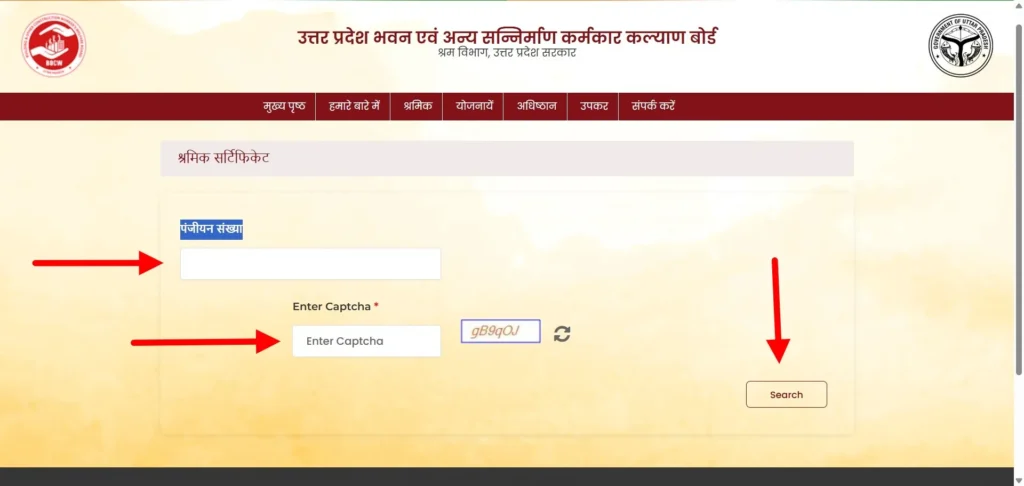
- Step 3: Enter Data: On the certificate page, enter your Aadhaar Number or your 14-digit Registration Number (पंजीयन संख्या).
- Step 4: Verify & Download: Complete the Captcha verification, click on “Search” (खोजें), and verify the OTP sent to your mobile. Your official Digital Shramik Card will appear; click download to save the PDF.
UPBOCW Scheme Application Status (योजना की स्थिति)
To verify if your scholarship, maternity aid, or marriage assistance money has been credited, use the official UPBOCW Scheme Tracker. This tool allows you to monitor the real-time progress of your financial benefits.
- Step 1: Open the Tracker: Visit upbocw.in and click on the “योजनायें” (Schemes) menu. Select the option “योजना के आवेदन की स्थिति” (Scheme Application Status).
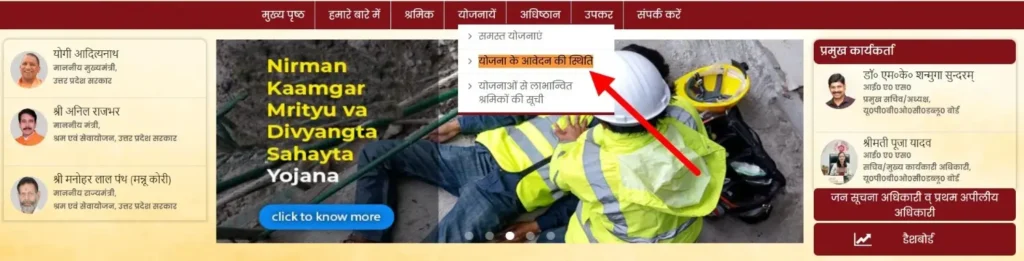
- Step 2: Enter Identity: On the next screen, enter either your 14-digit Registration Number (पंजीयन संख्या) or your Aadhaar Number.
- Step 3: Verification: Complete the Captcha and click the “Submit” button to view your payment status.
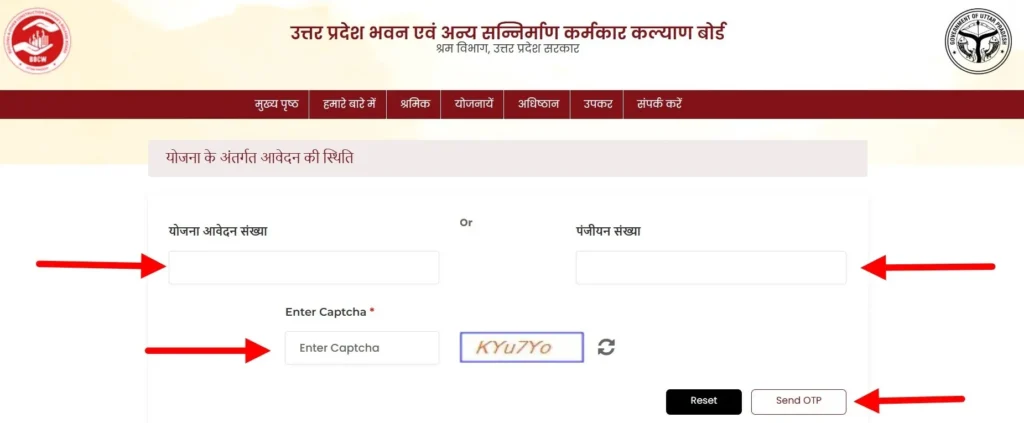
- Step 4: DBT Warning: If your status shows “Approved” but the money has not reached your account, visit your bank immediately to verify your NPCI Aadhaar Mapping. All UPBOCW payments are sent via DBT; without active bank mapping, your funds will remain stuck.
How to Register for UPBOCW Shramik Card in 2026 (Step-by-Step)
Applying for a new Shramik Card on the official upbocw.in portal is now a fully digital, paperless process. Now, the board has integrated Aadhaar-based e-KYC to ensure benefits reach genuine workers directly. Follow these exact steps to complete your registration without errors:
Step 1: Access the Official Registration Link
Visit the official portal at upbocw.in. On the homepage, find and click the prominent button labeled “श्रमिक पंजीयन” (Labour Registration).
Step 2: Enter Aadhaar & Location Details
A new page will open. You must provide the following:
- Select Circle (मण्डल): Choose your working division from the list (e.g., Lucknow, Kanpur, Agra).
- Select District (जनपद): Choose your resident district.
- Aadhaar & Mobile: Input your 12-digit Aadhaar Number and your Registered Mobile Number.
Step 3: Verification with OTP
Click the “Search” (खोजें) button. A 6-digit OTP will be sent to your mobile. Enter the code and click “Verify” (प्रमाणित करें).
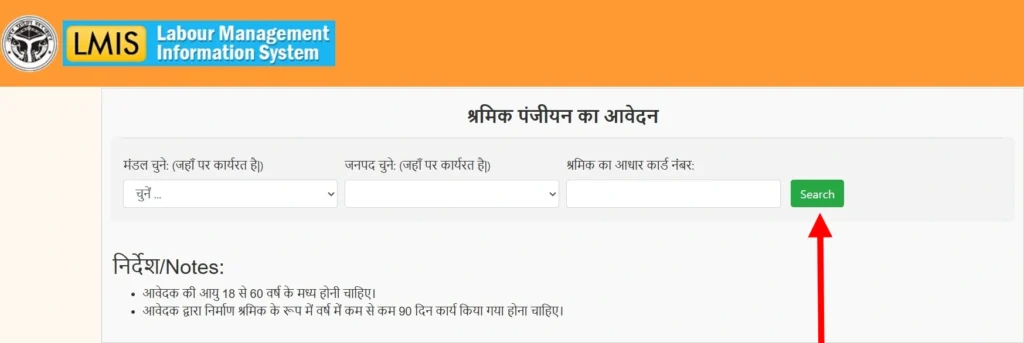
- Important: Your mobile number must be linked to your Aadhaar for the e-KYC to succeed in 2026.
Step 4: Filling the Digital Application
Once verified, the full form will appear. Fill in these details accurately:
- Work Details: Select your specific construction trade and confirm you have worked for 90+ days in the last year.
- Bank Information: Enter your Account Number and IFSC Code. Ensure this account is NPCI-linked for DBT payments.
- Nominee Details: Provide the name and relationship of your family nominee.
Step 5: Document Upload & Submission
Upload clear digital copies (under 100KB) of your Passport Photo, Aadhaar Card, and Niyojan Praman Patra (Work Certificate). Tick the declaration box and click “Submit”.
- Final Action: Save the 02-digit Application Number generated on the screen to track your status later.
Eligibility Criteria and Necessary Documents for Labor Card
To maintain the integrity of the welfare fund, the UPBOCW board has strict eligibility rules. Providing false information can lead to your card being blacklisted.
Who is Eligible? (पात्रता)
As per the new guidelines, you qualify for a Shramik Card if:
- Age Bracket: You are between 18 and 60 years old.
- Work Experience: You have completed at least 90 days of construction work in the last 12 months.
- Resident Status: You are a permanent resident of Uttar Pradesh.
List of 40+ Work Types Covered (पात्र कार्य सूची)
Google’s search systems and the UPBOCW board recognize these specific roles for 2026 eligibility. If you perform any of these, you can apply:
- Construction: Mason (Rajmistry), Construction Helper, Road-maker, Bridge/Dam/Tunnel worker.
- Specialized: Plumber, Electrician, Painter (Putai), Welder, Carpenter (Barhai), and Tile layer.
- Miscellaneous: Brick Kiln worker, Well digger, Marble/Stone polisher, and Blacksmith (Lohar).
Note: This is a partial list of the most common roles. All 40+ approved construction trades are available for selection in the dropdown menu during the “Step 4” registration process on the official portal.
Required Documents (ज़रूरी दस्तावेज)
Before starting your online application, keep these digital copies ready (Format: JPG/PNG/PDF, Size: under 100KB):
- Aadhaar Card: The primary identity document.
- Bank Passbook: Must show a clear Account Number and IFSC Code.
- Niyojan Praman Patra (Work Certificate): A certificate issued by your contractor or employer proving your 90 days of work.
- Passport Photo: A recent, clear photograph of the applicant.
UPBOCW Renewal Process: How to Extend Your Card Validity
Important: Before paying for a renewal, check your Shramik Card ‘Valid Up To’ (वैधता) date on your downloaded certificate; if it hasn’t expired yet, you do not need to pay the fee today.
A common mistake many workers make is assuming the Shramik Card is permanent. In reality, most UP Labor Cards are valid for either 1 year or 3 years. If you fail to renew before the expiry date, your access to 18+ government schemes—including the Atal School admissions and Kanya Vivah grants—will be immediately suspended.
The Renewal Fee Structure
While the initial registration is often free, the renewal requires a small “membership contribution” to keep your status active.
- 1-Year Renewal: ₹20 to ₹50 (varies slightly by district processing).
- 3-Year Renewal: ₹100 to ₹150 (Recommended for long-term peace of mind).
- Late Fee: If you renew after the grace period, a small penalty may be added to the base fee.
Actionable Step: The E-KYC Renewal Process
You don’t need to visit a government office. You can complete your E-KYC Renewal directly from your mobile:
- Visit upbocw.in and select “पंजीयन नवीनीकरण” (Registration Renewal).
- Enter your 14-digit Registration Number and Aadhaar Number.
- OTP Authentication: Verify your identity via the Mobile OTP sent to your Aadhaar-linked number.
- Update Details: If you have changed your mobile number or bank, update them now.
- Online Payment: Pay the renewal fee using UPI, Debit Card, or Net Banking.
- Download Receipt: Once the payment is successful, your card validity is extended instantly.
Complete List of 18+ UPBOCW Welfare Schemes (Yojna 2026)
Registered workers under the UPBOCW Board are entitled to a wide range of social security benefits. The Board has focused heavily on Direct Benefit Transfer (DBT) to ensure funds reach your bank account without middlemen. Below are the most critical schemes you can apply for today.
Atal Residential Schools (अटल आवासीय विद्यालय) 2026-27
This is a flagship scheme providing free, high-quality CBSE education, boarding, and meals to the children of registered workers.
- Admissions 2026: Entrance exams for Class 6 and Class 9 are scheduled for February 22, 2026.
- Eligibility: Workers must have an active Shramik Card with at least 3 years of membership (registered on or before November 30, 2022).
- Division Schools: There are 18 schools across UP divisions (including Lucknow, Kanpur, Varanasi, and Meerut).
- Action: Apply through your local Labor Office or the official portal before the January 31 deadline.
Financial Aid & Insurance Schemes
- Kanya Vivah Sahayta: Financial assistance for a daughter’s marriage. In 2026, the amount is ₹55,000 for general cases, ₹65,000 for female workers’ own marriage, and up to ₹1,00,000 for mass/group marriages (Samuhik Vivah). note: Amounts are subject to latest cabinet revisions; check the ‘Scheme Details’ PDF on the portal before final filing.
- Matritva, Shishu Evam Baalika Madad: * Female Workers: Receive 3 months’ minimum wage plus a medical bonus of ₹1,000.
- Newborn Grant: ₹20,000 for a boy and ₹25,000 for a girl child.
- Death & Disability Assistance: In case of an unfortunate site accident, the family receives up to ₹5,00,000 for accidental death or ₹2,00,000 for natural death, ensuring immediate financial relief.
Why is my UPBOCW Status Still Pending?
If your application has been stuck in “Pending” status for more than 15 days, it is likely flagged for a correction. Unlike competitors who give vague advice, here are the real rejection triggers we have identified:
- Work Certificate Issues: Your 90-day Niyojan Praman Patra must be clear. If the contractor’s mobile number is unreachable or the dates overlap with another registration, the system auto-rejects.
- Aadhaar-Bank Mismatch: Your name on the Shramik Card must match your bank passbook letter-for-letter. Even a small spelling difference will stop the DBT payment.
- Blurry Documents: The 2026 AI-based verification system rejects low-quality mobile photos. Ensure your passport photo and passbook scan are bright and readable.
What to do?
- Edit Online: Log in to the portal and use the “संशोधन” (Modification) option to re-upload documents.
- Visit in Person: If the portal doesn’t resolve it, visit your local Labour Office (श्रम कार्यालय) or a CSC e-District Center. Take your original Aadhaar and bank passbook for “Manual Mapping.”
UPBOCW List: How to Find Your Name in the 2026 District-wise List
Are you unsure if your registration is still active? You can check the Shramik Suchi to see all registered workers in your area. This is the best way to verify your status before applying for a scheme.
Steps to Search the Worker List:
- Visit the official site (upbocw.in) and click on the “श्रमिक” (Worker) tab.
- Select “श्रमिकों की सूची (जनपदवार / ब्लॉकवार)”.
- Filter by Location: Choose your District (e.g., Lucknow, Kanpur, Ghaziabad, Varanasi).
- Select Area: Choose between “Nagariya Nikay” (Urban) or “Vikas Khand” (Rural).
- Work Type: Select your trade (e.g., Rajmistry, Carpenter, or Electrician).
- Click Submit. You will see a list of names, registration IDs, and permanent addresses.
Note: If your name appears on this list but your card says “Expired,” you must complete the Renewal Process immediately to stay eligible for funds.
FAQ
My mobile number is not linked to Aadhaar. Can I still register?
No. In 2026, the UPBOCW portal requires a 6-digit OTP sent to your Aadhaar-linked mobile for e-KYC. Visit an Aadhaar center to update your number first.
Can I apply for two schemes (like Kanya Vivah and Matritva) at once?
Yes, provided you meet the eligibility for both. Each scheme requires a separate application via the “योजना आवेदन” link on the portal.
What is the ’90 days work certificate’ format for 2026?
It must be a self-declaration or a contractor-issued ‘Niyojan Praman Patra’ (Form-27) clearly stating your work dates and the site address.
Is there any offline way to renew my Shramik Card?
While the portal is primary, you can visit a local Jan Seva Kendra (CSC) or the Labour Office if you face fingerprint or OTP issues.
What is the “Cess Payment” link for?
This is only for Builders and Contractors. It is used to pay a 1% welfare tax on construction projects over ₹10 Lakh. Individual workers do not need to use this.
What is “Establishment Registration”?
This is for Employers who hire 10 or more workers. It registers the construction site with the government. If you are a laborer, you only need “Worker Registration,” not this.
Help & Support: UPBOCW Helpline and Head Office Address
For construction workers, official verification is the only way to avoid fraud. If your online application is stuck or you haven’t received your scheme funds via DBT, visiting or contacting the board directly is your best course of action. The board has increased transparency by providing localized support across all 75 districts of Uttar Pradesh.
UPBOCW Head Office (Lucknow)
If you are in the state capital or have a high-level grievance that local offices cannot solve, you can visit the headquarters:
Address: Uttar Pradesh Building and Other Construction Workers Welfare Board, 2nd Floor, A & D Block, Kisan Mandi Bhawan, Vibhuti Khand, Gomti Nagar, Lucknow – 226010 (UP).
Official Contact Channels
- Toll-Free Helpline: 1800-180-5160 (Available 10:00 AM to 5:00 PM on working days).
- Alternate Support: 91-522-2723921.
- Email Support: upbocboardlko@gmail.com (Best for sending screenshots of portal errors).
The Future of Digital Labor Services in UP
As we navigate through 2026, the UP Government’s vision for labor welfare has shifted from “manual filing” to “proactive protection.” The Mission Shakti and Digital UP initiatives are now integrating the Shramik Card with the family-based Pariwar ID, ensuring that if you are a registered construction worker, your family automatically qualifies for health covers like Ayushman Bharat without a separate application.
The 2026-27 roadmap includes the complete eradication of child labor through expanded admissions in the Atal Residential Schools and the introduction of AI-based “Smart Renewal Alerts.” These alerts will notify you via SMS 30 days before your card expires, preventing the sudden loss of benefits that was common in previous years.
Stay Updated: Don’t Miss the Next Beneficiary List
Government schemes and the “Shramik Suchi” (Beneficiary List) are updated every quarter. New names are added, and expired cards are removed regularly.
Pro-Tip for Workers: Bookmark this page now. We track every official notification from the upbocw.in portal and update our guides the moment a new list or scholarship deadline is announced.